This DIY 'OpenPuck' project allows the Steam Controller to emulate Xbox, Switch, and PlayStation controllers, but no wireless charging for you
🖥 PlayStation, Nintendo Switch, Xbox, PCNews
#Controllers#Hardware

This DIY 'OpenPuck' project allows the Steam Controller to emulate Xbox, Switch, and PlayStation controllers, but no wireless charging for you

PC Gamer RSS FeedAndy Edser3 min read(about 2 months ago)

Overview & Key Takeaways

Still, it's a perfectly practical puck in many respects.

The Steam Machine might have turned out to be a disappointment (mostly down to its price), but the Steam Controller remains a very useful thing.

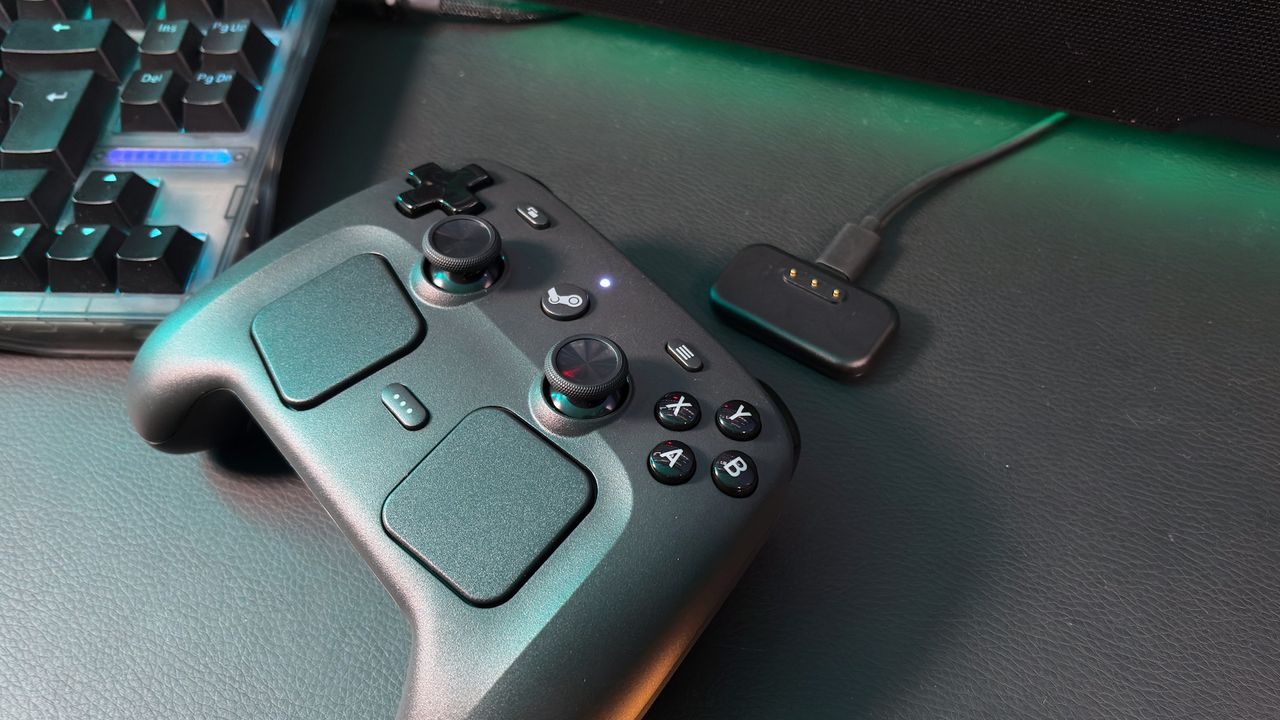
Should you be the tinkering sort, the OpenPuck project doubles down on the Steam Controller's Swiss Army Knife-like tendencies, allowing it to emulate Xbox, Nintendo Switch, and PlayStation controllers.

The OpenPuck is the work of Github user safijari, and the project is based around a Pro Micro NRF52840 board. This $8 device can be flashed to emulate the Steam Controller's regular wireless puck, and translates the controller inputs to their console equivalents while also enabling Steam-specific features (via Hackaday).

Latest Videos From

Although safijari says "the Switch and PS3 modes have been verified to work on real consoles," so your mileage may vary. By the looks of the project's page on Github, DualSense emulation is currently supported for PC only, and there are various caveats for emulation support to consider for each potential mode.

Pairing involves connecting the board and the Steam Controller to a PC with a USB Type-C cable and flashing the microcontroller, after which the controller itself can be wirelessly connected.

(Image credit: safijari)

"At any point you can hold all four back buttons and press X to switch over to Xbox mode which maps all canonical inputs to their expected counterparts," safijari confirms. "In this mode the right trackpad acts as a mouse, but at present this only works in Android and SteamOS."

Holding the back four buttons and Y switches to, err, Switch mode (with gyro and haptic support), whereas the same buttons + B puts it in "Lizard" mode, where the Steam Controller behaves as it does when Steam is closed—while it's still open.

Keep up to date with the most important stories and the best deals, as picked by the PC Gamer team.

"This has a few advantages," says safijari. "The biggest one being that you can use inputs when a high privilege application is in the foreground (like the Task Manager, when using Steam if you wanna be able to do that Steam must be run as admin)."

The project seems to be a work in progress, and the author warns that "Every part of this project HEAVILY used LLMs," so take that for what it's worth. Should you wish for a chassis to contain the puck properly, you'll also need to 3D print one for yourself—with several options offered.

Unfortunately, the OpenPuck isn't capable of charging your Steam Controller like the regular puck, as it lacks any pins. Otherwise, though, it seems to be a multi-talented little marvel.

As part of this project, safijari also includes reference to ReversePuck, which is their way to emulate Steam Controller inputs (except the grip controls) on the Steam Deck in order to use it as one of the world's most expensive console pads. It's an interesting part of the project for sure.

I had a feeling Valve's new hardware would excite the imaginations of the maker community, and by the looks of things, they're already beavering away finding all sorts of uses for the latest Steam-branded offerings.

Best PC controller 2026
Share:

More in PlayStation, Nintendo Switch, Xbox, PC

Onimusha: Way of the Sword - Stout Pillar locations🖥 PlayStation, Nintendo Switch, Xbox, PC

Onimusha: Way of the Sword - Stout Pillar locations

!(https://assetsio.gnwcdn.com/stout-pillars.jpg?width=690&quality=85&format=jpg&auto=webp) Early on in Onimusha: Way of the Sword(https://www.rockpapershotgun.com/games/onimusha-the-way-of-the-sowrd), you'll be tasked with finding three sentient idols that have been stolen from Hachidai Rikison Shrine in eastern Kyoto. These idols, dubbed the Stout Pillars, are hidden in different spots around the city, and you'll need to track them down in order to finish the "Careful What You Wish For" quest. In this guide, we'll reveal the locations of the three Stout Pillars and tell you everything that you need to do in order to locate all of them and advance the quest. Read more(https://www.rockpapershotgun.com/onimusha-way-of-the-sword-stout-pillar-locations)

RockGuides / Walkthroughs1 day ago
Onimusha: Way of the Sword - All bosses🖥 PlayStation, Nintendo Switch, Xbox, PC

Onimusha: Way of the Sword - All bosses

!(https://assetsio.gnwcdn.com/rasho-gan.jpg?width=690&quality=85&format=jpg&auto=webp) Onimusha: Way of the Sword(https://www.rockpapershotgun.com/games/onimusha-the-way-of-the-sword) marks the triumphant return of Capcom's samurai action franchise after a twenty-year hiatus, with all of the hallmarks that it possessed back in the PlayStation 2 days, including fast action, Issen counterattacks, and plenty of screen-filling bosses. Miyamoto Musashi will need every ounce of his wits and skill to beat these contenders, many of whom are dangerously fierce and reminiscent of Soulslike opponents, even though Way of the Sword is more of a traditional hack 'n slash action adventure game. Way of the Sword offers two difficulty modes upon startup, including a Story Mode that will let you decimate most enemies in your path. But on Action Mode, none of these bosses are a walk in the park, and some will even be a challenge on Story Mode. To help Musashi rise supreme against all contenders, we've got you covered with our comprehensive list of all bosses in Onimusha: Way of the Sword, along with strategies for beating them. Read more(https://www.rockpapershotgun.com/onimusha-way-of-the-sword-all-bosses)

RockGuides / Walkthroughs1 day ago
Onimusha: Way of the Sword - How to get Power Stones🖥 PlayStation, Nintendo Switch, Xbox, PC

Onimusha: Way of the Sword - How to get Power Stones

!(https://assetsio.gnwcdn.com/musashi-standing-by-shrine.jpg?width=690&quality=85&format=jpg&auto=webp) Power Stones in Onimusha: Way of the Sword(https://www.rockpapershotgun.com/games/onimusha-the-way-of-the-sword) are one of the most important currency types you can get. You need Power Stones to unlock most of Musashi's major skills. And yet for all their significance, Way of the Sword never tells you where or how to find them. There are two main ways of getting Power Stones. One is largely outside your control, as it happens naturally while you progress the story. The other takes a bit of tracking down, and careful exploration of each level outside of the central Kyoto hub. In this guide, we'll explain how to get Power Stones in Onimusha: Way of the Sword and what to look out for while you're searching for treasure. Read more(https://www.rockpapershotgun.com/onimusha-way-of-the-sword-how-to-get-power-stones)

🎮 Control
RockGuides / Walkthroughs1 day ago