How to reach the 10th floor at CEG Headquarters in Silent Hill Townfall
Overview & Key Takeaways
Here's how to enter CEG security and print a level 10 access card in Silent Hill: Townfall.
To reach the 10th floor in Silent Hill: Townfall, Simon must obtain a level 10 access card. Since he doesn't work at CEG Headquarters, he must use the computer at security to print a new card, but as always, the door is locked. Perhaps a strange whiteboard drawing and an audience of lockboxes may help him out.
Here's where to find the CEG HQ security door code in Silent Hill: Townfall, and how to solve the lockbox puzzle.
Find the CEG Headquarters security door code in Silent Hill: Townfall
After entering the CEG Headquarters in the "Inside CEG HQ" mission, Simon is asked to reach the 10th floor, but the elevator requires a CEG access card, which he doesn't have. To obtain this card, Simon must find the security door code and print one.
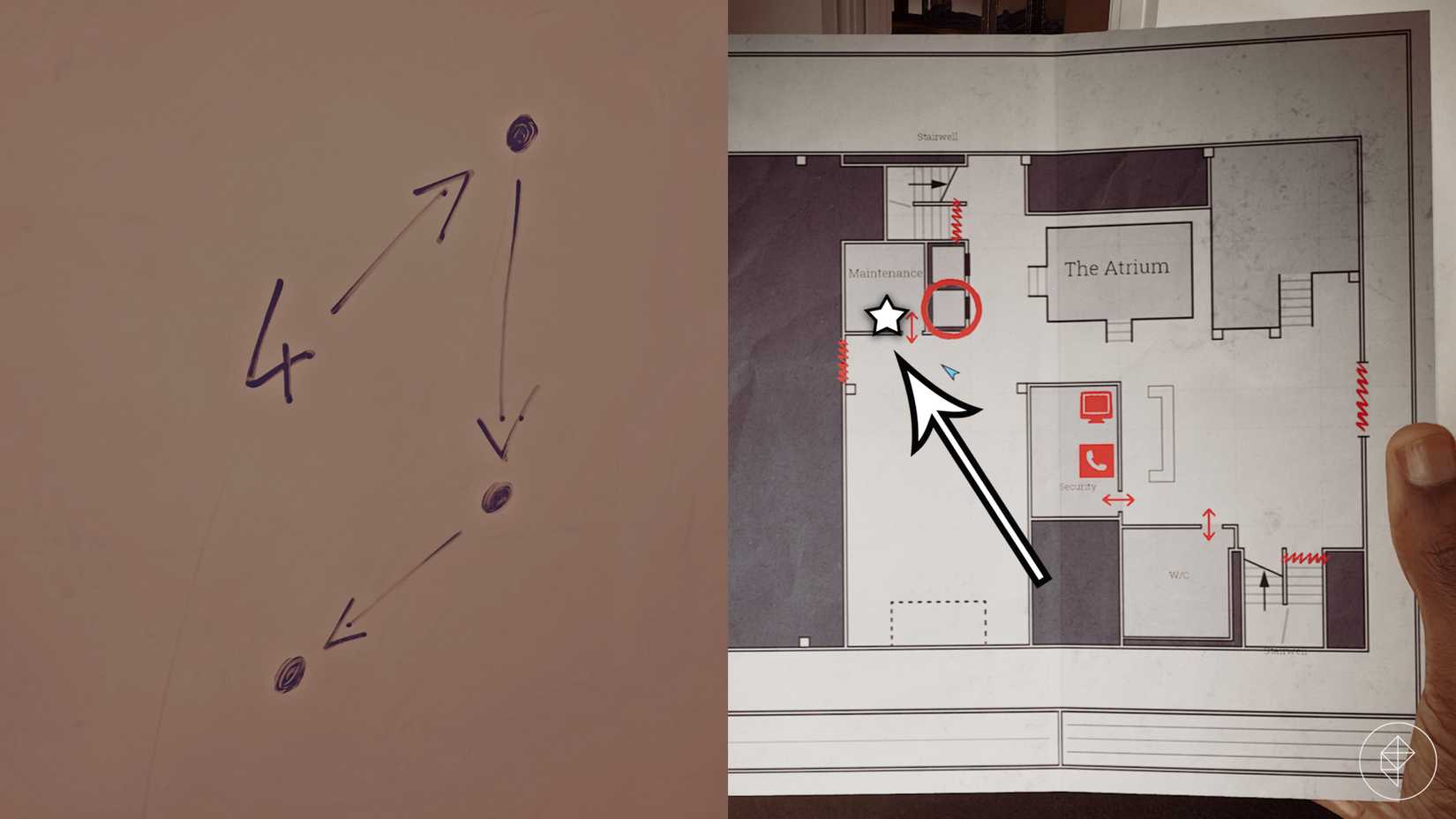
The hint that reveals the security door code is found in the maintenance room. See the dots, lines and the number 4 on the whiteboard? You simply need to start with "4" and press the numbers on the keypad in the same pattern.
So, the CEG Headquarters security door code is 4895.
 Graphic: Marloes Valentina Stella/Polygon | Source images: Screen Burn/Konami, Annapura Interactive
How to get a level 10 CEG access card in Silent Hill: Townfall
To print a new access card, Simon needs Richard's employee ID. First, collect the two halves of the case codes grid from the waste bins in the security and maintenance rooms. You'll find them here:
 Graphic: Marloes Valentina Stella/Polygon | Source images: Screen Burn/Konami, Annapura Interactive
Combine them in your inventory and go to the stage with the locked boxes. The case codes grid reveals every box' access code, but don't open a random box! You will lose HP if you do; you must only open Richard's box.
So, which box is Richard's? Walk onto the stage and collect the Box ID's and Names document from the lectern. According to this document, Richard is number 36, which is the third row from the stage, and third box from the right:
 Graphic: Marloes Valentina Stella/Polygon | Source images: Screen Burn/Konami, Annapura Interactive
As the case code grid will tell you, you must use the following code to open Richard's box: 486.
Collect Richard's employee file from his box and return to the computer at security. To print the CEG access card, enter Richard's employee ID: 00007820518. Take the level 10 access card and use it on the elevator to reach the 10th floor and complete the "Inside CEG HQ" mission in Silent Hill: Townfall.